Your budget at a glance – entirely without the cloud.
Sparblick is a free budget tracker for individuals, families and shared homes: categorise your monthly income and expenses, split shared costs fairly. Everything stays locally on your device – no cloud, no sign-up, no tracking.
Who is Sparblick for?
On your own, as a family or in a shared flat: you categorise your monthly income and expenses – and only split what is genuinely paid for together.
Individuals
One household, one overview: what comes in, what goes out – and how much is really left at the end of the month?
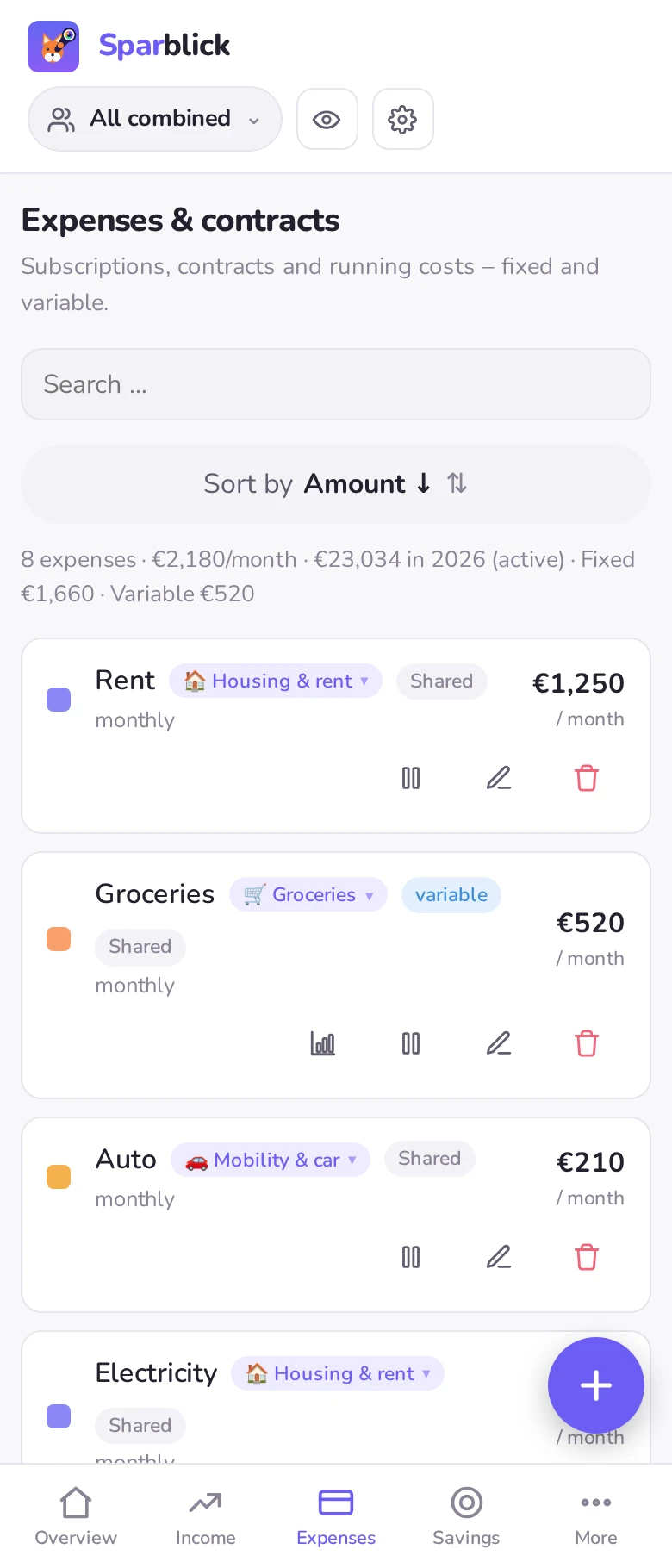
- Fixed costs, subscriptions and variable spending sorted by category, each with its share of your income
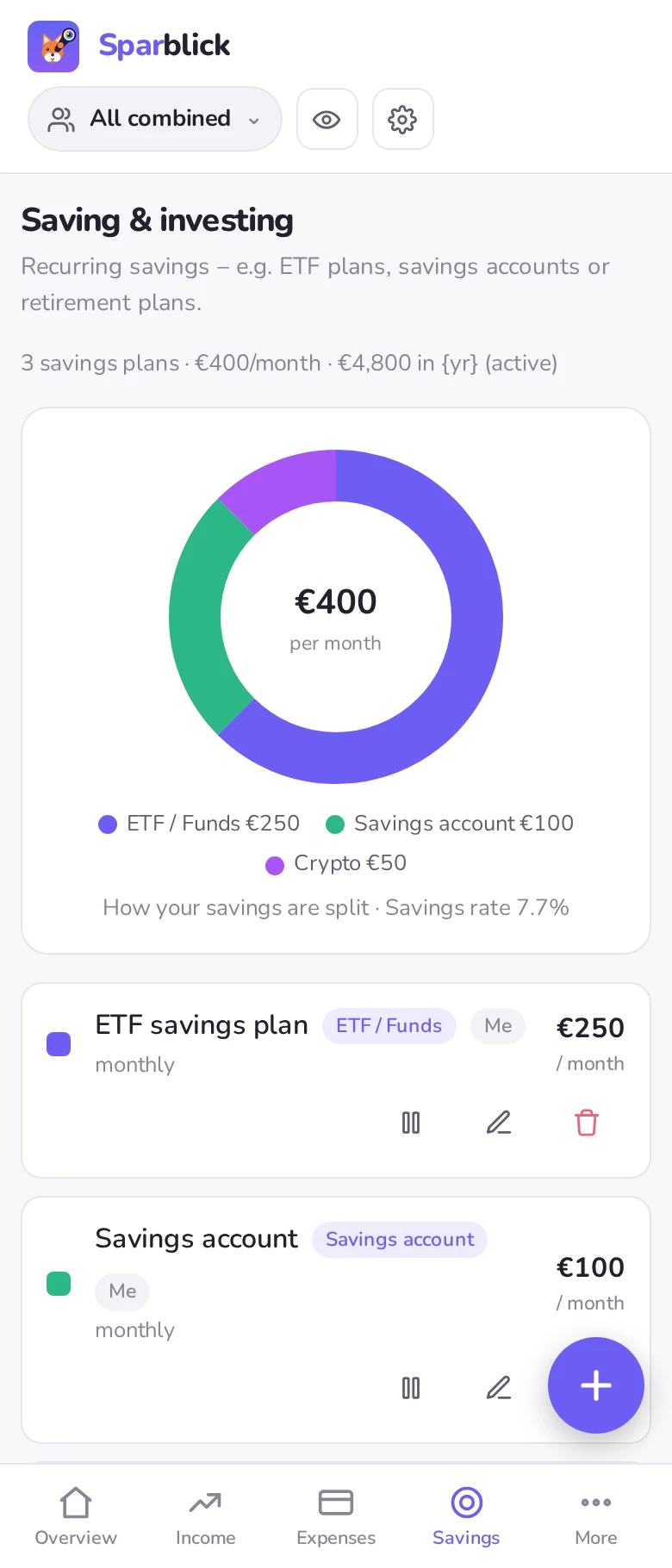
- Real savings rate and disposable income at a glance
- Splitting is off by default – no need to add people, no clutter
Couples & families
Everyone gets their own income and expenses – plus their fair share of the costs you carry together.
- Split shared expenses, savings and income 50/50 or proportionally by income
- Mark someone as a child: pocket money and their own savings, but no share of household costs
- Switch the view: everything combined or per person
Shared homes
Rent, electricity and internet run through one shared pot – everything else stays each person's own business.
- Freely chosen shares per person, for when the large room pays more than the small one
- Name the shared pot as you like – only those expenses get distributed
- Would rather not do the maths at all? Simply turn splitting off
Everything you need to stay on top of it
From fixed costs and contracts through savings to a fair split across the household.
Overview & savings rate
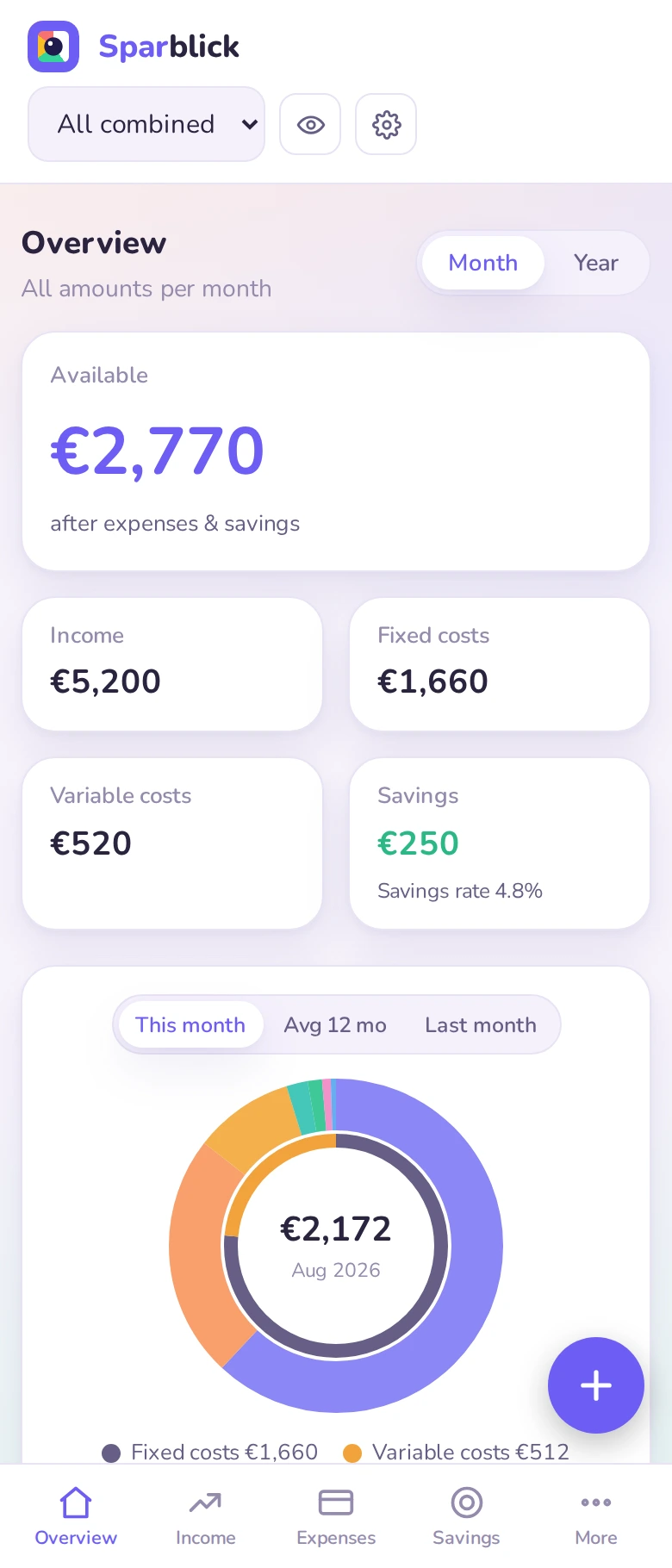
Income, expenses, your real savings rate and what is left to spend – with a donut chart and each category's share of your income, shown per month or per year.
Bank import (CSV, XML & PDF)
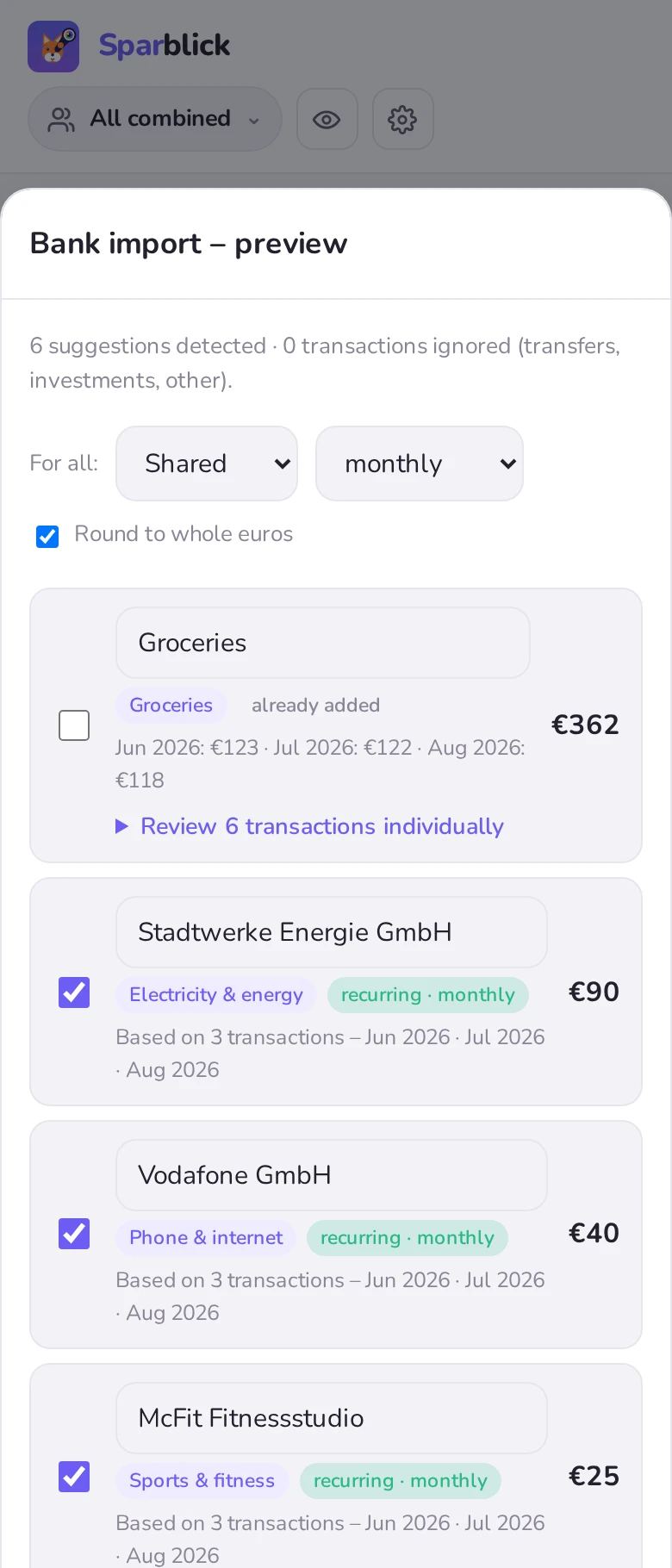
Read transaction lists from DKB, FYRST, Sparkasse, ING, American Express, Monzo (UK) & neon (CH), for DKB & Amex as PDF too – and via the camt.053 account statement (XML) many more European banks: recurring expenses are detected, groceries and the like are grouped together – you confirm each one with a tick.
Fair splitting
Split shared expenses, savings and income 50/50, by income or with custom shares (say 30/70) – including the flat you bought together or interest from a joint portfolio. Everyone sees their fair share – and if you live alone, you simply leave splitting switched off.
Cancellation deadlines
Record the contract end date plus its notice period – Sparblick warns you in good time, before a contract renews itself automatically.
JSON export & import
There is no database and no server holding anything of yours. To back up and transfer, Sparblick puts everything into a single JSON file that only you control: move your budget to a second device (phone ↔ computer) or pass it to your partner or flatmates – on import you choose replace or merge (without duplicates). Plus CSV for Excel/Numbers/Sheets and a one-page PDF for printing.
Anywhere & offline
Installable as a progressive web app on your phone or in your browser – and it works offline too.
Colour themes
Nine designs to choose from – light and dark, Ocean, Sunset and Matcha, right through to the colourful Candy, Flamingo or Synthwave – or simply follow your system setting.
Hide amounts
One tap on the eye in the header blurs every amount – handy on the bus, the train and in an open-plan office. The setting is remembered.
Nine currencies
Euro, Swiss franc, pound sterling, US dollar as well as Swedish, Norwegian and Danish krone, złoty and Czech koruna – switchable in the settings.
A colour theme that suits you
Pick your design at the top of the app – from understated to gloriously colourful. Your choice is remembered per device; “System” automatically follows your device's light/dark setting.
Split fairly when you live together
Who carries what? Sparblick splits shared expenses fairly – and everyone immediately sees their share and what is left over.
- Three splitting modes: 50/50, proportionally by income or freely chosen (say 30/70).
- A fair share per person: their own expenses plus their part of the shared costs.
- Children & pocket money: children are left out of the split but still have their own savings.
- Always optional: living alone, or sharing a flat without settling up? Just leave splitting off – it is disabled by default.

Your numbers belong to you
Sparblick stores everything locally on your device only (browser storage or the app's folder). There is no database, no account and no server holding your figures – none of it is ever transmitted. To back up or transfer, you export a JSON file yourself and pass it on.
For transparency: this website measures its reach without cookies and without recognising you – all that is recorded is the page visited, an approximate country and the device type, never your financial data. That is also why you see no cookie banner here. The details are in our privacy policy.
Up and running in a minute
Use it straight in your browser or put it on your phone.
📱 Browser & phone (PWA)
Nothing to install – just open it. On a phone you can also use your browser menu's “Add to home screen”; it then runs full screen and offline.
Open the app🤖 Androidcoming soon
Sparblick will be on the Google Play Store shortly. Until then, simply add the PWA to your phone – the features and your data are identical.
Install the PWASparblick Proin preparation
At some point Sparblick should be allowed to cost something – but only for things that do not exist today. And then as a one-off purchase, not a subscription: an app that helps you with your subscriptions should not be one itself.
🎁 Base – stays free
Everything described on this page belongs to the free version – no account, no ads, no trial period that runs out.
- Overview, real savings rate, categories and cancellation deadlines
- Bank import for every format supported today
- Fair splitting for couples, families and shared homes
- Export as JSON, CSV and PDF, all colour themes and currencies
- None of these features will move behind a paywall later
⭐ Pro – new things only
Planned as a one-off purchase in the mobile apps – Android and, once it exists, iPhone/iPad. Timing and price are not decided yet.
- Custom CSV format: map the columns of any transaction list yourself – so you can also read banks Sparblick does not know yet. Already built and deliberately locked until the purchase route exists.
Considered, but not built yet:
- Encrypted synchronisation between your own devices
- Automatic backup to iCloud or Google Drive
- Annual report as a PDF
- Multiple accounts in the bank import
- Home screen widgets
Browser and desktop stay entirely free – there is no Pro there and nothing to buy. And your JSON file stays interchangeable between all versions: whatever you created on your phone with Pro survives an export to your computer unchanged – even though you cannot edit it there. Either way, your data stays local.
Frequently asked questions
What does Sparblick cost?
Nothing. Everything described on this page is part of the free base version – no account, no ads, no trial period that runs out on you.
Where is my data stored?
Locally on your device only – in your browser's storage or the app's folder. There is no server and no cloud. You transfer it yourself via JSON export/import.
Do I need an account?
No. No registration, no email address, no login – just open it and get going.
Which banks can I import?
Currently DKB, FYRST, Sparkasse (CSV-CAMT and CSV-MT940), ING, American Express, Monzo (UK) and neon (Switzerland) as a CSV transaction list – for DKB and Amex as PDF too (account statement or monthly bill). Every other bank works through the camt.052/053 account statement (XML, ISO 20022), which many European banks offer for download in online banking. The importer is built so further banks can be added – and a custom column mapping for arbitrary CSV exports is in preparation as a Pro feature.
Is Sparblick worth it if I live alone?
Yes – that is the standard case. Splitting is switched off out of the box, so you never have to add people. You enter your income and expenses and see straight away which category eats what percentage of your income, what is fixed, what fluctuates and how much is really left.
Can I share it with a partner, family or flatmates?
Yes – through the fair household split (50/50, by income or with freely chosen shares, as is common in shared flats) and, if you like, a shared JSON file in a shared folder (Dropbox, for instance). There is deliberately no automatic cloud sync.
Will there be a paid version?
Yes, a Pro version with additional features is coming – but not at the expense of what you see today. The base version stays free and keeps the full feature set of this page; none of today's features will move behind a paywall later. Pro only adds new things on top and will be a one-off purchase, not a subscription – an app that helps you with your subscriptions should not be one itself.